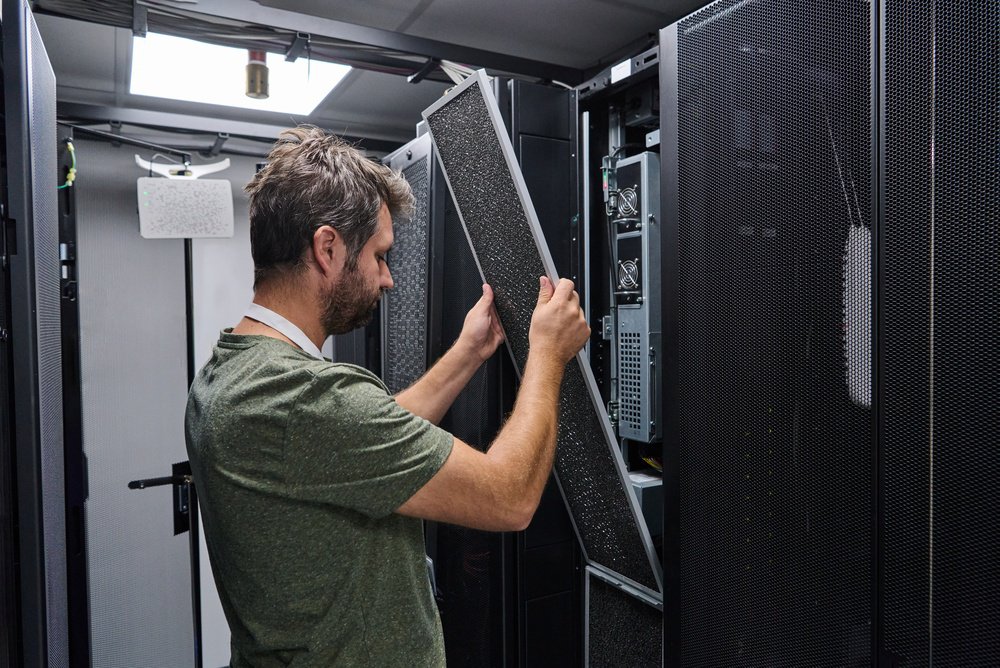

Most data center cooling problems aren't caused by undersized computer room air handler (CRAH) units. They're likely caused by conditioned air failing to reach the equipment it's meant to cool. Open cable cutouts in raised floors and unblanked rack U-spaces create bypass paths that pull supply air off course. Mismatched airflow tiles compound the problem. Instead of going to where it's needed, the cool air returns to the CRAH unit before it does any useful work.
CRAH units, along with CRAC units and AHUs, move conditioned air through a facility using precisely managed pressure differentials. That precision depends on the environment cooperating. Every open rack gap, unsealed floor cutout, and missing blanking panel redirects supply air off its intended path. Poor airflow distribution follows, and cooling performance drops across the facility.
Addressing these losses doesn't require a full infrastructure overhaul. It requires sealing the environment, measuring what's happening, and placing the right accessories where they're needed. This article breaks down the key interventions, why each one works, and how to sequence them.
How a Computer Room Air Handler Works (and Where Efficiency Breaks Down)
A CRAH unit conditions and circulates air using chilled water coils rather than direct refrigerant expansion. This makes it more energy-efficient at scale than a standard CRAC unit. It draws warm return air from the hot aisle and cools it across the coil. The conditioned air then discharges into the underfloor plenum or directly into the cold aisle.
What's harder to control is what happens after the air leaves the unit. If the surrounding environment isn't sealed, supply air takes the shortest path back to the return rather than the path leading through your equipment. A CRAH unit sized correctly for a facility's thermal load will still underperform when that's happening.
The three most common efficiency losses are bypass airflow through open floor cutouts, hot-to-cold aisle recirculation across rack tops, and short-circuit return through unblanked rack spaces. None of them requires replacing the computer room air handler. All of them respond to targeted accessories and a consistent management process.
Sealing the Underfloor Plenum With Koldlok Grommets
The underfloor plenum carries cold air to distribution points across the raised floor. Every unsealed cable cutout in that floor is a leak point. Most facilities carry dozens of them, built up over years of cable additions with no sealing protocol in place.
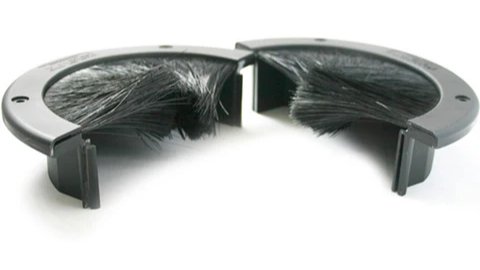
Koldlok grommets fit into standard floor tile cutouts and seal around cable bundles. Their job is to keep conditioned air in the plenum until it reaches its target. Air takes the path of least resistance. An open cutout next to a high-density rack pulls cold air before the airflow tiles servicing that rack receive any of it. Koldlok seals close those paths and push airflow back into the managed distribution system.
In environments where cable additions happen frequently, making grommet installation part of every cabling project stops the problem from accumulating. Facilities that audit their underfloor for the first time consistently find more unsealed cutouts than expected. Closing them produces an immediate reduction in thermal load on the CRAH system, often without touching anything else in the environment. It's one of the few interventions where the cost of materials and labor is minimal relative to the thermal gains. SET3's subfloor cleaning and inspection services locate every unsealed cutout and deliver a prioritized remediation plan.
Eliminating Hot-Aisle Recirculation With Blanking Panels
When rack U-spaces sit open, hot exhaust air from equipment above finds its way into the cold aisle. It mixes with supply air before reaching server inlets. Inlet temperatures climb, fan speeds compensate, and power consumption follows. The CRAH unit works harder than it should, and the equipment runs warmer than it needs to.
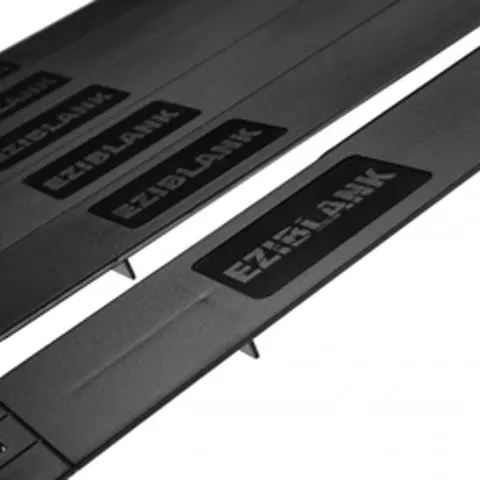
EziBlank blanking panels close those gaps. They require no tools, install in seconds, and fit standard 19-inch rack configurations. Filling every unused U-space consistently ranks as one of the most cost-effective ways to lower inlet temperatures. It's also the step that gets deferred most often: racks expand incrementally, blanking doesn't keep pace, and the thermal penalty builds quietly.
High-density AI deployments make this more consequential. Rack power densities in these environments have climbed sharply in recent years. The temperature differential between hot and cold aisles is considerably larger than in traditional server deployments. Recirculation carries a heavier thermal cost as a result.
Matching Computer Room Air Handler Airflow Tile Selection to Rack Density
Perforated airflow tiles distribute cold air from the plenum into the cold aisle. Their open-area percentage needs to match the cooling demand in front of them. A tile that's too restrictive in front of a high-density rack starves that equipment. One with too much open area in front of a lightly loaded rack wastes plenum pressure and creates turbulence in adjacent rows.
High-flow tiles, typically in the 25 to 56 percent open-area range, belong in front of racks with the highest power density. Standard tiles, with around 15 to 25 percent open area, suit lower-demand zones. Placement decisions that worked at 5 kW per rack often don't hold at 20 to 30 kW. The mismatch doesn't always surface through obvious symptoms. Warmer-than-expected equipment, inconsistent thermal readings across a row, and CRAH units running above expected load all point to tile placement that needs a review. Because tile layout directly affects how much cooling reaches each row, this review should be part of any hardware refresh or density increase. SET3's airflow solutions cover the full tile range and placement strategy.
Why Validation Belongs in Every Change Process
Changes to floor layout, rack population, or blanking configuration all warrant airflow and temperature validation afterward. Without it, there's no reliable way to confirm the physical changes produced the intended results. In particular, problems from adjacent changes, shifted tiles, or slightly misplaced accessories can go undetected for months. In addition, skipping validation after a major change is one of the more common reasons facilities report recurring thermal issues even after investing in the right accessories.
SET3's data center testing services cover pressure differential verification, particulate counts, and thermal mapping aligned with ASHRAE TC 9.9 standards for data processing environments. These tests confirm the interventions are working as intended and document a baseline for future reference. The gap between assumed airflow and validated airflow tends to surface as hotspots, throttling under load, or CRAH cycling frequencies that don't align with the unit's design specs.
When the Problem Goes Deeper Than Accessories
Floor-level interventions assume the floor itself is intact. A raised floor that has shifted from building settling or rolling equipment loads develops gaps between tiles. Those gaps let plenum pressure escape into the room rather than reach managed distribution points. A subfloor carrying years of accumulated debris restricts airflow through perforated tiles, regardless of how well everything above it performs.
Neither condition responds to blanking panels or grommets. SET3's subfloor cleaning services remove the particulate buildup that gradually degrades tile flow rates and plenum pressure. For floors that have shifted out of alignment, access floor tuning restores the sealed plenum geometry that the rest of the airflow management process depends on. Both issues tend to develop together in aging facilities and are often caught during the same site assessment.
Getting full performance from a computer room air handler requires managing the complete system. Treating each component as a separate maintenance concern rather than part of a single interdependent system is where most airflow management programs fall short. The unit, the plenum, the tiles, the racks, and the accessories all need consistent attention.
To find out whether your facility's airflow setup performs the way your equipment requires, contact the SET3 team to schedule a review.